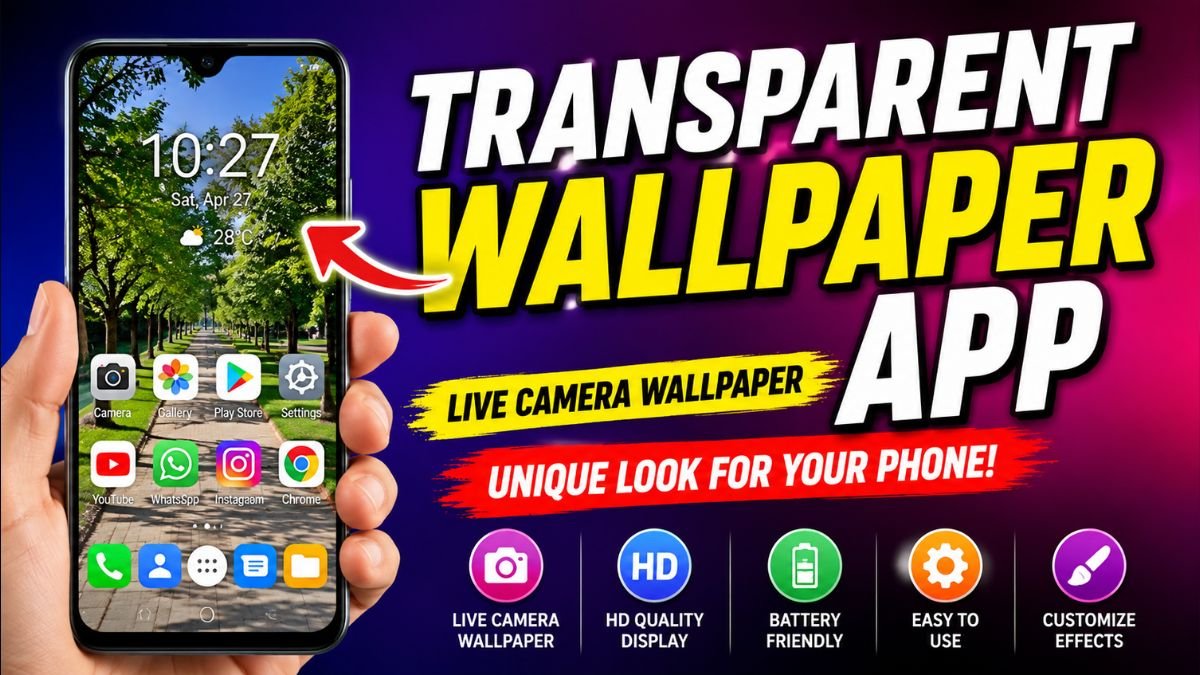
A Transparent Wallpaper App is an Android application that uses your phone’s rear camera to create a live wallpaper, giving the illusion that your screen is transparent. Instead of displaying a static image, the wallpaper continuously shows the live camera feed behind your device, creating a unique and futuristic appearance.
Introduction
Android users are always searching for new ways to personalize their smartphones. From icon packs and widgets to live wallpapers and custom launchers, personalization has become one of Android’s biggest strengths. Among the latest trends, Transparent Wallpaper Apps have gained massive popularity because they offer a completely different visual experience.
Unlike traditional wallpapers, a transparent wallpaper uses your phone’s camera to display the environment behind your device directly on the home screen. The result is an eye-catching illusion that makes your phone appear almost transparent.
Whether you want to impress your friends, create a futuristic setup, or simply refresh your phone’s appearance, a transparent wallpaper app can provide a unique look without modifying your device’s hardware.
In this guide, you’ll learn how transparent wallpaper apps work, their features, benefits, installation process, and tips for getting the best experience on your Android phone.
Table of Contents
- What is a Transparent Wallpaper App?
- How Does It Work?
- Top Features
- Benefits
- Battery Consumption
- Performance
- Installation Guide
- Best Tips
- FAQs
- Final Verdict
How Does a Transparent Wallpaper App Work?
Many people believe transparent wallpapers somehow make the phone display see-through. In reality, the effect is created using your smartphone’s rear camera.
When the app is activated, it accesses the camera and displays the live camera feed as your wallpaper. As you move your phone, the background changes in real time, creating the illusion that you’re looking through the device.
This effect works on:
- Home Screen
- Some Lock Screens (depending on Android version)
- Certain custom launchers
Because it relies on the camera, the wallpaper remains dynamic rather than static.
Key Features of Transparent Wallpaper Apps
Modern transparent wallpaper apps include many features beyond the basic camera background.
1. Live Camera Wallpaper
The primary feature is a live wallpaper that continuously displays the rear camera view.
This creates a realistic transparent screen effect while you use your phone.
2. HD Camera Display
Many apps support high-quality camera output for a sharper and more realistic appearance.
Depending on your phone, you may enjoy:
- HD preview
- Full HD wallpaper
- Smooth camera refresh
- Better color reproduction
3. Easy Setup
Most transparent wallpaper apps require only a few steps:
- Install the app.
- Grant camera permission.
- Tap Set Wallpaper.
- Choose Home Screen or Home & Lock Screen.
- Enjoy your new transparent effect.
No rooting or advanced configuration is required.
4. Lightweight Design
The best apps are designed to use minimal system resources.
A lightweight transparent wallpaper app helps maintain:
- Smooth scrolling
- Fast app launching
- Stable performance
- Better battery life
5. Custom Camera Effects
Some apps include additional visual enhancements such as:
- Blur effects
- Brightness adjustment
- Contrast controls
- Color filters
- Zoom options
These settings let you personalize the wallpaper according to your environment.
6. Compatibility with Android Devices
Most transparent wallpaper apps support a wide range of Android brands, including:
- Samsung Galaxy
- Google Pixel
- Xiaomi
- Redmi
- Realme
- Oppo
- Vivo
- Motorola
- OnePlus
Always check the app’s requirements to ensure compatibility with your Android version.
Benefits of Using a Transparent Wallpaper App
A transparent wallpaper offers more than just a cool visual effect.
Gives Your Phone a Unique Appearance
The live camera background makes your device stand out from traditional wallpapers.
Instead of using ordinary photos or landscapes, your phone continuously displays the real-world environment behind it.
Fun Personalization
Android is known for customization, and transparent wallpapers provide another creative way to personalize your smartphone.
They work well with:
- Minimal icon packs
- Transparent widgets
- Dark themes
- Modern launchers
Combining these elements creates a futuristic and stylish home screen.
Easy to Use
Most apps are beginner-friendly and can be configured within minutes.
No technical knowledge is required, making them suitable for users of all experience levels.
Great for Demonstrations and Social Media
Many users install transparent wallpapers to create engaging videos or showcase unique phone setups on social media platforms.
The effect often attracts attention because it gives the illusion of a transparent display.
Battery Usage: Does a Transparent Wallpaper App Drain Battery?
One of the most common questions Android users ask is whether a Transparent Wallpaper App significantly affects battery life.
Since these apps use your phone’s rear camera to create a live wallpaper effect, they naturally consume more power than a traditional static wallpaper. However, modern smartphones are equipped with efficient processors and battery optimization features that help minimize the impact.
The actual battery usage depends on several factors:
- Screen brightness
- Camera resolution
- Processor efficiency
- App optimization
- Background applications
- Screen-on time
If you’re using a well-optimized Transparent Wallpaper App, the battery drain is generally manageable during normal daily use.
Tips to Reduce Battery Consumption
If you enjoy the transparent effect but want to maximize battery life, follow these practical tips:
Lower Screen Brightness
Reducing brightness is one of the easiest ways to save battery.
Close Unused Apps
Running fewer background applications allows your phone to dedicate resources more efficiently.
Use Battery Saver Mode
Many Android phones include built-in battery optimization that limits background activity while keeping essential functions active.
Disable the Wallpaper When Not Needed
If you’re traveling or need longer battery life, temporarily switch back to a static wallpaper.
Keep the App Updated
Developers regularly release updates that improve performance, fix bugs, and optimize power consumption.
Performance on Modern Android Phones
Today’s Android smartphones are much more capable of handling live wallpapers than older devices.
If your phone has:
- 4GB RAM or more
- Android 10 or newer
- Snapdragon, MediaTek, Tensor, or Exynos processors
you’ll usually experience smooth performance.
Premium devices generally provide:
- Faster animations
- Better camera processing
- Higher frame rates
- Improved multitasking
- Enhanced battery management
Budget smartphones may occasionally experience slight delays if multiple heavy apps are running simultaneously.
Privacy and Security Considerations
Because Transparent Wallpaper Apps rely on the camera to create the transparent effect, users should pay attention to privacy before installing one.
Choose apps that:
- Request only necessary permissions
- Clearly explain why camera access is required
- Have positive user reviews
- Receive regular updates
- Are published by reputable developers
Avoid downloading APK files from unknown websites unless you fully trust the source and verify the file’s safety.
Transparent Wallpaper vs Live Wallpaper
Many users confuse transparent wallpapers with traditional live wallpapers.
Here’s a quick comparison:
| Feature | Transparent Wallpaper | Traditional Live Wallpaper |
|---|---|---|
| Uses Camera | ✅ Yes | ❌ No |
| Animated Background | ✅ Yes | ✅ Yes |
| Real-Time Effect | ✅ Yes | ❌ No |
| Battery Usage | Medium | Low to Medium |
| Custom Images | Limited | Yes |
| Interactive Experience | High | Moderate |
If you’re looking for a futuristic and dynamic home screen, a Transparent Wallpaper App offers a unique experience compared to standard animated wallpapers.
Who Should Use a Transparent Wallpaper App?
These apps are suitable for a wide range of Android users.
Android Customization Enthusiasts
If you enjoy experimenting with launchers, icon packs, widgets, and themes, a transparent wallpaper adds another layer of personalization.
Content Creators
Many YouTubers, TikTok creators, and tech reviewers use transparent wallpapers in videos because they create visually engaging smartphone demonstrations.
Students
Students who like creative phone setups often use transparent wallpapers to make their devices stand out among friends.
Technology Lovers
Anyone interested in futuristic technology or innovative Android features may enjoy the transparent screen illusion.
How to Install a Transparent Wallpaper App
Installing a transparent wallpaper is simple and usually takes just a few minutes.
Step 1: Download the App
Install a trusted Transparent Wallpaper App from a reliable source such as the Google Play Store or the official website of the developer.
Step 2: Grant Camera Permission
The app requires camera access to display the live background.
Without this permission, the transparent effect cannot function.
Step 3: Preview the Wallpaper
Most apps allow you to preview the transparent effect before applying it.
Adjust the settings if necessary.
Step 4: Apply the Wallpaper
Tap Set Wallpaper and choose:
- Home Screen
- Lock Screen (if supported)
- Home & Lock Screen
The transparent effect will activate immediately.
Customization Options
Modern Transparent Wallpaper Apps often include additional customization features.
Popular options include:
- Brightness adjustment
- Camera quality selection
- Blur effects
- Mirror mode
- Landscape support
- Portrait mode
- Auto-start after reboot
- Dark mode compatibility
These settings allow users to personalize the experience based on their preferences and device capabilities.
Common Problems and Solutions
Wallpaper Stops Working
Restart the app and ensure camera permission remains enabled.
Black Screen Appears
Some devices restrict camera access while another app is using the camera.
Close camera-based applications and reopen the wallpaper app.
Increased Battery Drain
Reduce screen brightness and disable the wallpaper when it’s not needed for extended periods.
Slow Performance
Free up RAM by closing unnecessary background applications and updating both the wallpaper app and your Android system.
Best Practices for the Best Experience
To enjoy smooth performance and an attractive home screen:
- Keep Android updated.
- Use the latest version of the wallpaper app.
- Choose a lightweight launcher if possible.
- Avoid running multiple live wallpapers simultaneously.
- Restart your device occasionally to refresh system resources.
- Regularly review app permissions for privacy and security.
Following these recommendations helps maintain a responsive device while enjoying the transparent wallpaper effect.
Pros and Cons of Transparent Wallpaper Apps
Like any Android customization app, Transparent Wallpaper Apps come with both advantages and limitations. Understanding these will help you decide whether this type of wallpaper suits your daily needs.
Pros
1. Unique and Eye-Catching Appearance
A transparent wallpaper instantly transforms the look of your smartphone. Instead of a static image, your home screen displays the live view captured by your phone’s camera, creating a futuristic effect.
2. Real-Time Live Background
Unlike traditional wallpapers, the background changes dynamically as you move your phone, making your device feel more interactive.
3. Easy to Install
Most Transparent Wallpaper Apps can be installed in just a few minutes without rooting your Android device. Simply grant camera permission, preview the wallpaper, and apply it to your home screen.
4. Highly Customizable
Many apps include options such as:
- Camera quality adjustment
- Brightness control
- Blur effects
- Wallpaper refresh rate
- Portrait and landscape support
- Dark mode compatibility
These features allow you to personalize the transparent effect according to your preferences.
5. Compatible with Most Android Devices
Many transparent wallpaper apps support popular Android brands including:
- Samsung
- Xiaomi
- Redmi
- Vivo
- Oppo
- Realme
- Motorola
- Google Pixel
- OnePlus
This wide compatibility makes them accessible to most Android users.
Cons
Higher Battery Usage
Since the app continuously uses your phone’s rear camera, battery consumption is generally higher than with static wallpapers.
Camera Remains Active
The transparent effect depends on constant camera access, which may slightly increase processor usage and device temperature during extended use.
Performance on Older Devices
Older smartphones with limited RAM or slower processors may experience occasional lag or reduced responsiveness when using live camera wallpapers.
Not a Real Transparent Display
It’s important to understand that these apps create the illusion of transparency using the camera feed. The screen itself does not become physically transparent.
Transparent Wallpaper vs Static Wallpaper
Many Android users wonder whether a transparent wallpaper is worth replacing a traditional background.
| Feature | Transparent Wallpaper | Static Wallpaper |
|---|---|---|
| Live Camera View | ✅ Yes | ❌ No |
| Animated Effect | ✅ Yes | ❌ No |
| Battery Friendly | Moderate | Excellent |
| Personalization | Excellent | Good |
| Interactive Experience | High | Low |
| Performance Impact | Moderate | Minimal |
If you enjoy experimenting with your Android phone and want a fresh look, a transparent wallpaper provides a much more interactive experience than a traditional background.
Frequently Asked Questions (Featured Snippet Optimized)
What is a Transparent Wallpaper App?
A Transparent Wallpaper App uses your smartphone’s rear camera to display a live camera feed as your home screen wallpaper. This creates the visual illusion that your phone is transparent while maintaining normal Android functionality.
Is a Transparent Wallpaper App Safe?
Yes, if downloaded from a trusted source. Since the app requires camera access to create the transparent effect, always review requested permissions, install apps from reputable developers, and keep the software updated.
Does a Transparent Wallpaper Drain Battery?
Transparent wallpapers generally consume more battery than static wallpapers because they use the camera continuously. However, optimized apps and modern Android devices help minimize battery usage.
Can I Use It on Any Android Phone?
Most Transparent Wallpaper Apps support Android 8.0 and later, although compatibility varies depending on the device model, Android version, and hardware capabilities.
Does It Work on the Lock Screen?
Some applications allow transparent wallpapers on both the Home Screen and Lock Screen, while others only support the Home Screen. This depends on the app and your Android version.
Is Internet Access Required?
Most transparent wallpaper apps do not require a constant internet connection for the wallpaper effect itself. However, some may use internet access for ads, updates, or downloading additional themes.
Can I Customize the Wallpaper?
Yes. Many apps allow you to adjust brightness, camera quality, blur effects, transparency levels, and other settings to create a personalized look.
Will It Slow Down My Phone?
On modern smartphones with sufficient RAM and processing power, performance is usually smooth. Older devices may experience reduced performance if multiple background applications are running simultaneously.
Tips for Choosing the Best Transparent Wallpaper App
Before downloading any app, consider the following factors:
- High ratings and positive user reviews
- Regular updates from the developer
- Lightweight performance
- Minimal battery consumption
- Clear privacy policy
- Secure permission handling
- Compatibility with your Android version
- Easy-to-use interface
Selecting a well-maintained app helps ensure a better experience and long-term reliability.
Why Transparent Wallpapers Are Popular in 2026
Transparent Wallpaper Apps continue to attract Android users because they combine creativity with technology. As smartphone customization evolves, users increasingly seek interactive experiences rather than static designs.
These apps are especially popular among:
- Android enthusiasts
- Students
- Gamers
- Tech reviewers
- Content creators
- Social media influencers
The transparent effect often becomes a conversation starter and gives devices a modern, futuristic appearance.
Final Verdict
A Transparent Wallpaper App is an excellent choice for Android users who want to give their smartphones a fresh and distinctive appearance. By using your device’s camera to create a live wallpaper effect, these apps offer a creative alternative to traditional backgrounds.
While they consume more battery than static wallpapers, the visual experience, customization options, and ease of installation make them appealing for users who enjoy personalizing their devices. Choosing a trusted app, keeping it updated, and managing permissions responsibly will help ensure smooth performance and a safe experience.
If you’re looking to make your Android phone stand out in 2026, a Transparent Wallpaper App is one of the easiest and most entertaining ways to transform your home screen without modifying your device.
Conclusion
Android has always been known for its flexibility and customization options, and Transparent Wallpaper Apps are another example of how users can personalize their devices in unique ways. Whether you’re interested in a futuristic home screen, creating engaging social media content, or simply trying something different, these apps provide an innovative visual effect that’s easy to set up and enjoyable to use.
Explore different apps, compare their features, and choose one that balances performance, battery efficiency, and customization. With the right Transparent Wallpaper App, your smartphone can achieve a stylish and interactive look while remaining practical for everyday use.